
For U.S. steel fabricators, Mill Test Reports (MTRs) are the backbone of quality control, compliance, and traceability. Yet in many shops, these vital documents remain trapped in email attachments, paper folders, or unstructured digital files.
The challenge isn’t just collecting MTRs — it’s connecting them to the systems that drive production, design, and inspection.
MTR automation solves this by feeding clean, validated material data directly into your ERP, CAD/CAM, and quality control dashboards, creating a real-time, error-free flow of information across the shop floor.
This post takes you under the hood of how MTR automation integrates with existing steel fabrication systems, with real-world use cases, workflows, and diagrams.
Why Integration Is the Game-Changer
Manual MTR management creates four chronic pain points in fabrication shops:
Double Data Entry – Entering the same information into ERP, spreadsheets, and QC logs.
Production Delays – Waiting for QA teams to manually verify MTRs before issuing materials.
Compliance Risks – Misfiled or missing MTRs leading to failed inspections or rejected work.
Inefficient Traceability – Difficulty linking finished assemblies back to original test reports.
Integration turns MTRs from static documents into live, actionable data, eliminating bottlenecks and reducing risk.
How the Integration Works
The process typically follows these steps:
Ingestion – The system receives supplier MTRs in any format (PDF, scanned image, Excel).
Data Extraction – OCR + AI parsing reads heat numbers, material grade, chemistry, tensile/yield strength, and more.
Validation – Data is cross-checked against purchase orders and compliance rules.
System Sync – Verified MTR data is pushed to ERP, CAD/CAM, and QC dashboards.
Real-Time Access – Production teams can retrieve linked MTRs instantly from any workstation or mobile device.
Integration Architecture Overview
(Diagram already provided earlier – clean, minimalist visual showing MTR Automation Engine as the hub between suppliers and operational systems.)
Use Case 1 – ERP Integration (FabSuite, STRUMIS)
Scenario: Supplier sends 20 MTRs for beams and plates.
Automation Flow:
AI parses each file → matches heat number to PO in ERP.
If data matches, MTR is automatically attached to the job order.
If mismatch or missing data, material is flagged for QA review.
Impact: Eliminates manual typing, reduces PO mismatch errors, and ensures MTRs are always tied to the right project.
MTR Received → OCR & AI Parsing → Auto-match to PO → [Match: Attach & Notify] / [No Match: Flag to QA]
—————————————————————————————————————————–
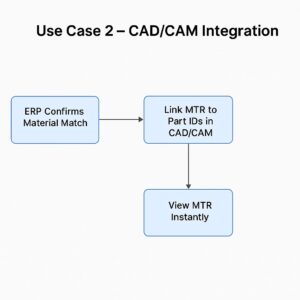
Use Case 2 – CAD/CAM Integration (Tekla Structures, ProNest)
Scenario: Design team needs to link MTR data to part geometry in the CAD/CAM model.
Automation Flow:
ERP confirms material match.
MTR data (heat number, grade) is linked to part IDs in CAD/CAM.
Welders scan QR codes on work orders to view original MTRs instantly.
Impact: Every cut, weld, and assembly is traceable to its original test report — essential for DOT and infrastructure projects.
————————————————————————————————————————-
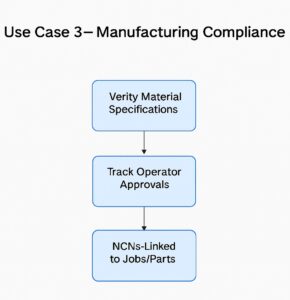
Use Case 3 – QC Dashboard Integration
Scenario: QA manager needs real-time visibility into compliance status.
Automation Flow:
QC dashboard receives structured MTR data with pass/fail flags for ASTM, ASME, AWS standards.
Out-of-spec material is automatically quarantined in the system until resolved.
Impact: Prevents non-compliant material from entering production, avoiding costly rework or penalties.
Key Benefits of Integrated MTR Automation
| Feature | Manual Process | Automated Integration |
|---|---|---|
| Data Entry | Hours/days | Minutes/seconds |
| Error Rate | High | <1% |
| Real-Time Access | No | Yes |
| Compliance Verification | Manual & slow | Automated & instant |
| Traceability | Paper/email based | Digital & searchable |
| Audit Readiness | Time-consuming | Instant reports |
Best Practices for a Smooth Integration
Start with Clean Master Data – Ensure purchase orders, supplier codes, and part numbers are standardized before integration.
Use APIs Over Manual Imports – For true real-time updates, API-based integration beats batch uploads.
Pilot with One System First – Begin with ERP or QC integration before adding CAD/CAM.
Involve QA Early – Their requirements for compliance and reporting will guide system mapping.
Automate Exception Handling – Flag and quarantine mismatched or incomplete MTRs automatically.
MTR automation isn’t just a compliance tool — when integrated with ERP, CAD/CAM, and QC systems, it becomes a production accelerator.
Steel fabricators adopting this approach can expect shorter job turnaround times, fewer compliance issues, and fully traceable project histories — all while freeing staff from repetitive admin work.